A digital concept you learn through this course
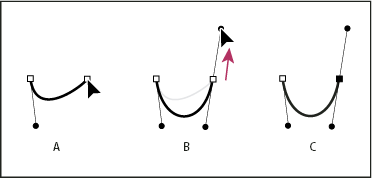
The DIG2000 course has taught a wide variety of new concepts and techniques which can be applied to digital editing tools and software. One of the most useful techniques taught this semester was the ability to use the Pen Tool offered in Photoshop. While a rudimentary tool in the belt of many digital media professionals, this tool can be quite difficult to master.
With the use of tutorials, students were taught how to successfully use the Pen Tool to capture logos from images. One benefit of this technique is that it enables the user to accurately capture the specific shape of a form whereas free-handing the element with the Lasso Tool may yield less-refined results.
https://clippingpathindia.com/blogs/tips/how-use-pen-tool-photoshop-beginner-tutorial This tutorial was able to assist with step-by-step instructions on the usage of the tool. This tutorial can be used by both beginners and experts looking to master Photoshop’s features.
When drawing with the pen tool, the Path drawn creates a Work Path which is shown in the Paths Panel. Similarly, with Shape selected, a new Shape Path is created which appears in the Paths Panel as well as the Layers Panel. Creating a shape can allow for a mask to be made. Users can also change the Shape setting to change the stroke and fill color as well as the thickness.
The pen tool has features that allow the user to create curved lines along a path that creates a smooth, seamless finish for cut segments. This feature is incredibly important for all digital media editors.

